Creating Professional 3D Gold Text Effects in Photoshop with Simple Gold
Designing visually striking text is essential for making your digital projects stand out. Whether you're working on a website header, social media cover, or promotional banner, the right text effect can elevate your design from ordinary to extraordinary. One of the most popular and versatile effects is the Simple Gold 3D Photoshop Text Effect, which offers an elegant way to add depth and luxury to any text without requiring advanced skills. This article will walk you through how this resource works, why it's useful, and the many ways you can apply it to your creative endeavors.
What Is the Simple Gold 3D Photoshop Text Effect?
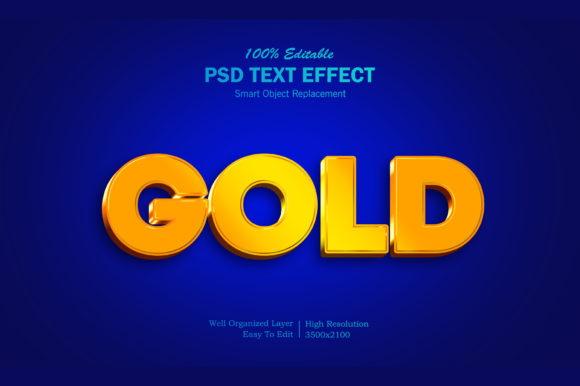
The Simple Gold 3D Photoshop Text Effect is a high-quality graphic resource designed for Adobe Photoshop users who want to incorporate a premium 3D gold aesthetic into their text quickly and efficiently. It comes as a PSD file with smart objects and well-organized layers, making it easy to customize. The final output includes both a fully editable Photoshop document and a pre-rendered image file, ready for use in various contexts.
Why You Need This Tool in Your Design Workflow
Many designers face common challenges when trying to create professional-grade text effects. These include:
- Limited time to master complex techniques like lighting, shadows, and layer blending manually
- A desire for consistent quality across different projects
- Need for quick customization without losing resolution or style
- Difficulty achieving a realistic 3D metallic look
With the Simple Gold 3D Photoshop Text Effect, these hurdles are significantly reduced. Its smart object feature allows you to replace the placeholder text instantly, while maintaining the integrity of the effect. This makes it ideal for those who want to focus more on creativity and less on technical execution.
How to Use the Simple Gold 3D Photoshop Text Effect
Using this tool is straightforward and user-friendly. Here’s a step-by-step guide to get started:
- Open the PSD File: Launch Adobe Photoshop and open the provided .psd file. All layers are clearly labeled for easy navigation.
- Edit the Smart Object: Locate the smart object named "Your Text" and double-click to open it. Replace the default text with your own message or phrase.
- Save and Close: After editing, click "Save" and then close the smart object. The changes will automatically appear in the main file.
- Finalize the Design: Adjust colors, contrast, or background elements if needed. Once satisfied, export the image using Photoshop’s built-in tools for web or print use.
This seamless process ensures that even beginners can produce stunning results within minutes. The help file included (Read Me.txt) provides additional tips and tricks to enhance your workflow further.
Practical Applications and Creative Possibilities
The versatility of the Simple Gold 3D Photoshop Text Effect makes it suitable for a wide range of applications. Some of the most effective uses include:
- Website Elements: Use it for headers, banners, or call-to-action buttons to add a touch of sophistication and visual appeal.
- Social Media Covers: Create eye-catching Facebook, YouTube, or Twitter covers that reflect a premium brand identity.
- Poster and Flyer Designs: Ideal for event posters, movie titles, or product launches where a bold and luxurious text effect is desired.
- Logo Presentations: Showcase logos with a 3D gold finish for presentations or portfolio work.
- Banner Promotions: Highlight special offers or announcements with a high-resolution, attention-grabbing text style.
- T-Shirt and Clothing Design: Add a unique 3D gold title or slogan to apparel graphics, giving them a modern edge.
- Greeting Cards and Illustrations: Use the effect creatively in holiday cards, birthday designs, or other illustrated materials.
Each of these scenarios benefits from the clean and professional appearance that the 3D gold effect brings. Whether you’re designing for print or digital platforms, the high resolution (3500x2100 at 300 dpi) ensures that your work looks sharp and polished on any screen or medium.
Customization Tips and Best Practices
While the Simple Gold 3D Photoshop Text Effect is already impressive, there are several ways to tweak it for better results:
- Experiment with Fonts: Though the effect is pre-designed, try different fonts inside the smart object to match the tone of your project—serif fonts may feel more classic, while sans-serif can give a modern twist.
- Adjust Backgrounds: Place the gold text over contrasting backgrounds such as dark gradients, textured walls, or abstract patterns to make it pop.
- Incorporate Lighting Effects: Use layer styles or blend modes to add subtle ambient lighting around the text for a more dynamic composition.
- Combine with Other Elements: Integrate icons, illustrations, or shadow effects to complement the gold text and enhance the overall design.
- Export Properly: When exporting for web use, consider saving in PNG format for transparency and clarity. For print, ensure CMYK color mode is used if necessary.
These small adjustments can help you tailor the effect to suit your specific needs, ensuring that it aligns perfectly with your brand or project theme.
Different Ways Users Can Approach This Effect
Depending on your experience level and goals, you might use the Simple Gold 3D Photoshop Text Effect in different ways:
- Beginners: Focus on replacing the text and using the pre-built layers exactly as they are. This approach is perfect for learning the basics of smart objects and layer management in Photoshop.
- Intermediate Designers: Tweak layer styles, add custom textures, or combine multiple effects to achieve a more personalized look. This allows for deeper experimentation while still benefiting from the ease of the original template.
- Advanced Users: Use the gold text as a base and build upon it with custom scripts, brushes, or animations for more complex projects like motion graphics or interactive web elements.
No matter your skill level, the tool adapts to your needs and helps you stay productive without sacrificing quality.
Real-World Examples of Success
Here are some real-world examples of how the Simple Gold 3D Photoshop Text Effect has been used effectively:
- A local café used the gold text on its new branding package, including logo presentation slides and greeting cards, to evoke a sense of elegance and quality.
- An indie filmmaker incorporated the effect into a trailer poster, using the 3D gold title to highlight the name of the film in a dramatic yet refined way.
- A digital marketing agency applied the text effect to YouTube thumbnails and banner ads, resulting in higher engagement rates due to the eye-catching design.
- A clothing brand utilized the gold text for T-shirt designs, creating a modern and artistic collection that stood out in online marketplaces.
These cases illustrate how the same tool can be adapted for varied industries and purposes, proving its value as a multipurpose design asset.
Considerations Before Using the Resource
To maximize the effectiveness of the Simple Gold 3D Photoshop Text Effect, keep the following considerations in mind:
- Compatibility: Ensure you have Adobe Photoshop installed. The resource is not compatible with older versions below CS6.
- Text Length: Avoid overly long text strings, as they may disrupt the balance of the 3D structure. Short phrases or single lines tend to look best.
- Color Harmony: While the gold effect is rich and warm, consider the background colors and other elements in your design to maintain visual harmony.
- Use Appropriately: Reserve the gold effect for projects where a premium or celebratory tone is appropriate. Overuse could lead to a cluttered or unprofessional appearance.
By keeping these points in mind, you’ll be able to use the resource more strategically and integrate it smoothly into your designs.
Conclusion: A Powerful Tool for Quick, High-Quality Results
The Simple Gold 3D Photoshop Text Effect is more than just a design shortcut—it’s a powerful tool that empowers creators to deliver professional, impactful visuals in minimal time. With its smart object functionality and high-resolution output, it simplifies the process of adding depth and richness to text-based designs. Whether you’re a freelancer, hobbyist, or part of a larger creative team, this resource can streamline your workflow and expand your creative possibilities.
So next time you need to add a touch of class and dimension to your text, remember the Simple Gold 3D Photoshop Text Effect. It’s not only efficient but also highly adaptable, making it a valuable addition to any designer’s toolkit.
If you find the Simple Gold 3D Photoshop Text Effect helpful, don’t forget to rate it. Your feedback helps others discover the same high-quality solutions and contributes to the ongoing improvement of design resources available online.